NotebookLM has been my quiet productivity companion for months. I used to wrestle with recording my own podcasts — multiple takes, second-guessing every syllable, and worst of all, hearing my voice on playback. (All of us can relate to being our own worst critic.)
Then NotebookLM introduced audio overviews, and everything changed. No more late-night re-records. No more wondering if I sounded like I had a head cold. Just AI-generated audio summaries that let me focus on the content instead of the mechanics.
Now, Google has taken the next step: Video Overviews.
But before you imagine instant Hollywood-level magic, let me be clear: this is still day one. And on day one, even the best AI tools have their quirks.
When Research Becomes a Movie (Sort Of)
Video Overviews take your sources — PDFs, Google Docs, web pages, even YouTube transcripts — and spin them into AI-narrated slideshows with visuals, diagrams, and key excerpts. It’s not flashy animation, but it’s surprisingly good at transforming text-heavy materials into something that feels (more or less) watchable.
For my “first attempt” video, I used the “Discover” feature on NotebookLM, (a feature that seems to be limited to the desktop version only.) With this feature, Notebook will do your research for you. You need only bring your concept.
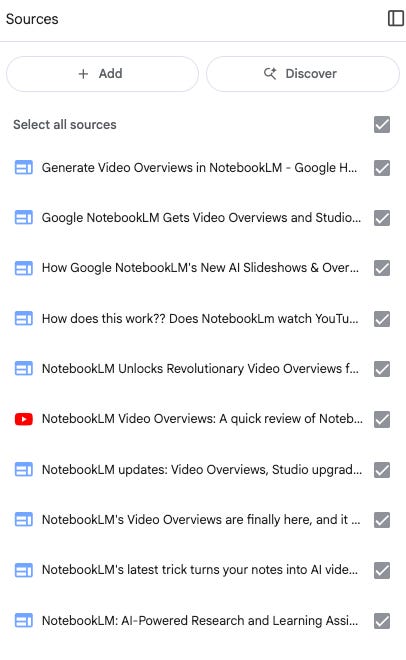
I wrote a simple prompt telling NotebookLM I wanted a video about NotebookLM. It very quickly found ten sources, (and more isn’t always better. I will explain in a moment.)
I clicked “Generate” and… waited. And waited. Somehow, I didn’t realize I’d clicked the Generate button again. All total, I ended up with three videos. Oh, that would explain the wait. (Other users, though, reported an average wait time of 12 minutes per video.)
Since I had three videos, I went through them to see the results. And… it was like watching a bunch of PowerPoint presentations about NotebookLM. (Yawn.) I couldn’t even get through them all, so I won’t torture you with them here.
OK, this will NOT do.I used all of those sources to create a “Briefing Document” in NotebookLM and then created this article. I then used this article to create the Video overview.
And, then I was able to create an interesting Video Overview.
So, what did I learn?
I wouldn’t call it “garbage in, garbage out,” as all of those sources were accurate. More like “stuffy and uninteresting in” and “stuffy and uninteresting” out.
The video overview can only generate “good stuff” from “good stuff.”
How to Get Started with Video Overviews
If you want to try it yourself, here’s the quick path:
* Upload your sources (PDFs, Docs, or even YouTube links) into NotebookLM.
* Select “Video Overview” in the new Studio panel.
* Add a steering prompt (e.g., “Explain for beginners” or “Focus on financial trends”).
* Click generate — then be patient. (Coffee helps.)
* Review and refine. You can adjust prompts or generate multiple versions until it’s right.
Pro Tip: Start with smaller documents before you throw a 200-page market report at it.
What You Can Do With NotebookLM
You can use NotebookLM for a wide range of tasks, from breaking down complex research papers into digestible summaries to creating study aids like video overviews and mind maps. Educators can turn lesson materials into structured multimedia content, while students can generate simplified explanations or exam review guides. In business settings, it can summarize financial reports, prepare briefing documents, or create quick training resources. Even for personal learning, NotebookLM can organize and explain dense topics, helping transform scattered sources into clear, actionable insights.
How Video Overviews Differ From Audio Overviews
Video, obviously. But beyond the fact that you can actually see things, Video Overviews go further than their audio-only cousins. While Audio Overviews provide quick, podcast-style summaries you can listen to while folding laundry, Video Overviews turn your source materials into narrated, slide-style presentations. This makes them especially useful for explaining charts, diagrams, and other content that benefits from visuals. The voice used in Video Overviews is also different from the two familiar voices in Audio Overviews, and while it currently has fewer style options, it delivers a clear, structured experience that works well for topics where “just listening” isn’t quite enough.
How Will This Help Me?
Before I started to use NotebookLM for my podcasts, I recorded them myself. Picture me - usually in my shed, as I attempted to find a quiet spot- surrounded by too many helmets and a lot of paint. It took me multiple takes to get a single podcast done, sometimes taking hours. All of this took time away from writing. In the "video overview,” they describe it as “pure fun.” Eh, that’s a liberal interpretation. Creating a podcast is hard work, and I did it as a way to help promote the newsletter. But, ironically, it took precious time away from the newsletter.
So, when Google burst onto the scene with their AI tool that could record podcasts for me, I happily turned over the mic. More time for writing? Yes, please. But, this wasn’t just about freeing me from a task that was often frustrating. Audio overviews created extra hours in my workflow.
With those extra hours, I made THE DROIDS NEWSLETTER. Now, my son has joined me as part of the editorial team. It’s been a fantastic project, and all of it happened because I found a few extra hours in my week.
Final Thoughts- whether to video or audio?
NotebookLM’s Video Overviews won’t replace human insight — but they are another tool to help break down your research. Research feels less static. Learning feels less one-dimensional. Even the dreaded quarterly report starts to look… almost approachable.
Now, this being said, there are times when I still want audio. Each of these tools has its time and place. I could envision myself creating these videos when I want to create quick little “explainers.” (Google has another great tool called “Google Vids,” also just launched, that is excellent for creating explainer vids. I’ve been on the Google Labs testing team for that one for over a year and highly recommend it.)
But, a few minutes ago, I spotted an announcement from Google DeepMind and a new paper about the AlphaEarth AI model. Secret confession: I love listening to academic papers as I fall asleep at night. So, within a few minutes, NotebookLM had generated a 12-minute audio overview of AlphaEarth. Perfect. Can’t wait to hear my latest bedtime story from Google.
It’s not magic, but it’s a glimpse of how a research tool can improve your daily life.
Fun Facts (Because Why Not?)
* 🎙 I have three Spotify channels, two YouTube channels, and two newsletters. So, yes, I do a lot of research.
* 🎧 There are two Spotify channels named “Deep Learning with the Wolf” — a quirk of Spotify’s RSS feed system. Long story. No regrets. Both are great. There are no wrong choices here.
* 🏒 I was once a DJ at 89 WGSU Geneseo and the “Ice Knights” hockey color commentator. Fun twist: the first hockey game I ever saw was also the first one I called live. Turns out, improv is a life skill.
#deeplearningwiththewolf #thedroidsnewsletter #googlenotebooklm #googledeepmind #audiooverview #videooverviews #dianawolftorres #alphaearthfoundations