I’ve never had a secretary before. Or a chief of staff.
With these AI agents, I suddenly feel like I have both.
This week, among other things, they:
* Researched and booked Amtrak train tickets for me
* Briefed me about important overnight emails and upcoming meetings
* Surfaced an important contract I had overlooked
* Turned my bookshelf into a visual reading list
Unlike older chatbots, these agents can take action proactively without waiting for a prompt. They can go online and research or buy things, make reservations, or fill in forms. They can look through various documents, transcripts, and emails to help you finish tedious projects.
I’m testing 12 agents
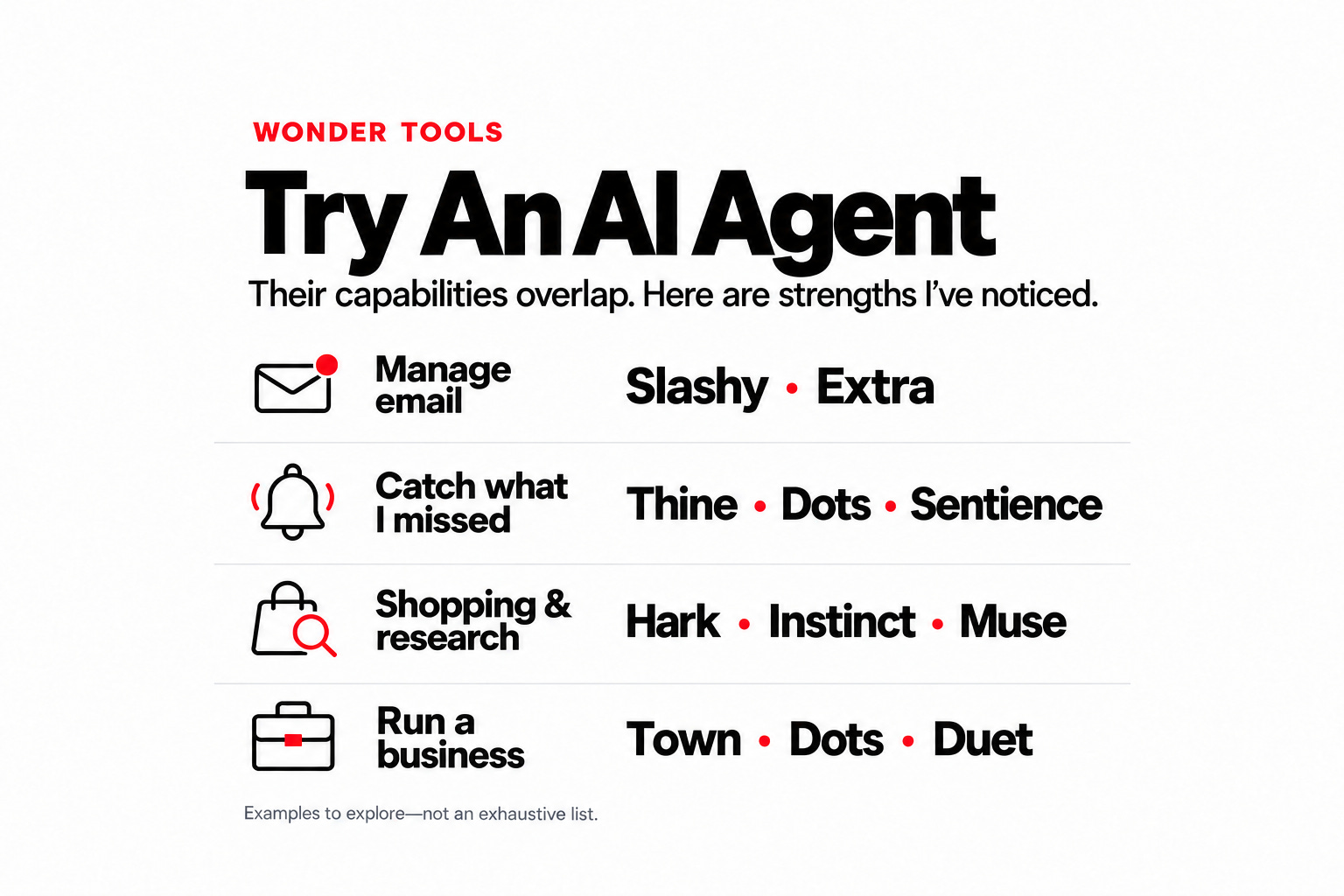
Agents are the biggest step forward for AI this year. I’m testing a dozen to compare their reliability, features, and design: Thine, Instinct, ChatGPT’s Dots, Town, Hark, Muse, Poke, Ambi, Sentience, Extra, Slashy, and Claude’s Duet.
My early favorites: Dots, Slashy, and Hark
* Dots has helped me spot calendar conflicts and find and prepare materials I need for work. I use it several times a day.
* Slashy has changed how I manage email. It’s a strong alternative to Superhuman, the email app I’ve used for years. Slashy puts an AI agent inside my inbox.
* Hark has a standout design. It’s been reliable for shopping and reservations.
Other observations
* Business agents will be a separate category. Town, for example, is easy to use and well-designed, but its features are tuned to small businesses and mid-market firms.
* These are early impressions. I’ll share more as the tools develop. I’m working on a post about Slashy and how to use AI to help with email overload. The inbox is where I see early agents being most helpful.
One is enough
Start with one agent that does what you need. I’m testing a bunch for now, but ultimately I’ll prioritize just a few with distinct strengths.
What they cost
Some agents, like Instinct, Hark, and Muse, start out free. Others require a paid subscription.
* Dots is so far only available on ChatGPT’s Pro plan, which starts at $100/month.
* Town starts free, but the Pro plan is $49/month.
* Hark starts free. Upgrade for $20/month for more AI usage or $100/month for full power.
* Thine is free to start. It’s $15/month or $120/year for extra capabilities.
* Pricing for other agents is still taking shape. You can test many for free. Before connecting your accounts, check on ongoing costs and how each service uses your data.
Connect your email, calendar, and files
Thine and Dots became much more useful as soon as I connected them to my email, calendar, documents, and Granola meeting transcripts. Now they have a broad view of my projects for context, as well as a detailed understanding of my emails and tasks. Drawing on meeting transcripts, they even understand what I’ve promised to do.
2 reasons to try an AI agent
* They save time by handling pesky tasks that used to take hours. Examples:
* Hark coordinated a tricky travel itinerary and handled the booking on Amtrak’s clunky site.
* Dots pulled a batch of related emails into a doc, a task that would otherwise have taken me 45 minutes.
* They prevent headaches. They don’t wait for me to send a prompt. Numerous times they’ve helped me avoid costly errors. Examples:
* Dots found an appointment mentioned in a buried email and alerted me that it was missing from my calendar.
* Thine reminded me to send an important email I had forgotten.
5 differences between agents and chatbots
* They’re easier to get started with. Claude Code, Codex, and tools like Hermes Agent are at least as powerful as most agents I’m describing here, but they can seem intimidating. Setting them up is a bit like learning to use a manual camera. You have to figure out which connections to enable, which plugins to add, and which skills to install. Agents like Thine, Hark, and Town are more like point-and-shoot cameras. They guide you through setup and connections to your calendar, email, Notion, etc., with explanations in plain language.
* You text them like a person. Many agents, like Instinct, Poke, and Slashy, work in SMS, iMessage, or WhatsApp. So you don’t have to open an app or browser tab. It’s like messaging a colleague instead of walking over to the help desk.
* They reach out to you. Chatbots wait for your prompt. You might go days without remembering to use one. Agents send morning briefings, flag missing details on your calendar, and nudge you about unsent drafts. It’s the difference between a chief of staff who knocks on your door versus a reference librarian waiting at a desk.
* Flexible models. Most agents can switch among models from different AI providers, like travel agents who can book any airline. ChatGPT, Gemini, or Claude rely primarily on their own models.
* You have one ongoing conversation, not hundreds of chats. I like how Thine and Dots keep a single long-running thread. Both remember our past conversations reliably. Chatbots I use scatter my history across lots of threads, which can make older exchanges hard to find.
The lines are blurring
For now the differences are noticeable, but major AI companies are adding similar capabilities. OpenAI’s Dots is already an excellent, if expensive, agent, and Claude Duet arrived on October 23.
I avoided the first generation of AI agents, like OpenClaw, because they seemed complex and risky. But several agents I’m testing are easy to use, and free to try.
What I hand off, and what I don’t
My goal isn’t to outsource my thinking or writing. I enjoy both. I want agents to handle background tasks like filing, organizing, and checking email for important messages. Or filling in annoying online forms. That leaves me more time to concentrate, with less worry that I might be missing an important message or task.
4 ways my AI chief of staff helps
1. Tame my inbox
I now get three times as many emails as I did three years ago. Many are AI-generated marketing or PR messages. With that email slop strewn across my three addresses, it’s easy to miss an important message among more than 1,000 emails a week. AI agents help me:
* Summarize important new messages. At 8 a.m. my agents text me a summary of important emails from the previous evening and overnight. Instead of starting the day by scanning through hundreds of messages, I can just act on five important ones.
* Handle irrelevant email for me. I respond myself to important and personal messages. But I don’t have the four hours it would take to reply to the hundreds of unsolicited, irrelevant emails I get every day. My agent can sort and archive those, or, in some cases, suggest quick “no, thank you” notes I can edit.
2. Plan my day
Mapping out my day at 8:30 a.m. means fewer decisions later, when I’m less focused, about what I should be doing.
My agents can look at my calendar, email, project materials, task list, and notes to suggest a detailed plan based on my preferences. They know I need breaks for stretching and meditation, a lunchtime walk, and time to call Mom. They use data from Rize, my time-tracking app, to estimate how long tasks usually take me.
During my Friday review, they help me reflect on next week’s priorities, tasks that need follow-up, and long-term projects to start. I head into the weekend feeling less stressed.
3. Research tricky decisions
In a day, I might have five to 10 questions an AI butler can help me research. I recently needed to turn 11 lengthy Google Docs into a printed book. I had to compare file conversion tools, check prices and reviews for book-printing services, and understand the technical steps.
That research would once have taken me an hour or more. This time I asked an agent to handle it and went back to preparing to teach. About five minutes later, my agent delivered an excellent recommendation in the Google Doc I’d requested.
I don’t like shopping. But I like knowing I’m getting a well-reviewed product or service at a good price. Hark and Instinct can compare options, recommend what to buy, and set up the purchase for me to confirm. Caveat: Check how free shopping agents make money, and whether their recommendations include paid placements.
4. Organize files
Connect an AI assistant to your files and work apps, like Google Drive, Slack, and Notion. Then ask it to move documents between folders. You can ask it to summarize document changes or ticket activity, or to create a new dashboard.
The hardest part is deciding what to delegate. I often ask my agents to suggest useful tasks they can handle. I tell them what tasks I find most annoying, what I enjoy doing myself, and what I can’t risk messing up.
Caveats
* A new monthly bill. If you already pay for ChatGPT, Gemini, or Claude, adding another AI bill may seem extravagant. But for what will likely end up costing about $5 a week, you get a 24/7 assistant. If that saves you time and stress, it may feel worth it. As competition heats up, your main AI subscription may soon include an agent. For now, it’s like streaming. Netflix alone might be enough for some, but others happily pay for Hulu, Apple TV, and Disney+ too.
* Expect periodic roadblocks. The services are still new. One told me it could send me a text, but not an email. Another said it could open docs from only one of my Google accounts. These annoyances can stall an otherwise useful task. Some problems have quick fixes. Others require workarounds while these services develop. I remember having to use two separate computers when dial-up Internet meant waiting minutes for each Web page to load.
* Connecting your accounts can be a nuisance. Assistants need permission to access your accounts. That’s important for protecting your security. But it can create headaches when you have multiple Gmail accounts, extra sign-in steps, or workplace restrictions. I’m glad security protections prevent random people from logging into my accounts. But expect some setup friction.
* Some won’t survive.For now, the money is flowing freely. Town raised $108 million this week at a $1 billion valuation and Instinct raised $1 billion recently. (My interview with Town’s CEO will appear soon in Fast Company.) As individuals and businesses choose their agents, subscription fatigue may limit how many they’re willing to pay for.
The bottom line: If you haven’t yet experimented with an AI agent, start a free trial. Assign a few research, summarization, and shopping tasks. Judge it by the usefulness of its response, the time it saves, and how easy it is to use. Leave a comment to share your impressions 👇