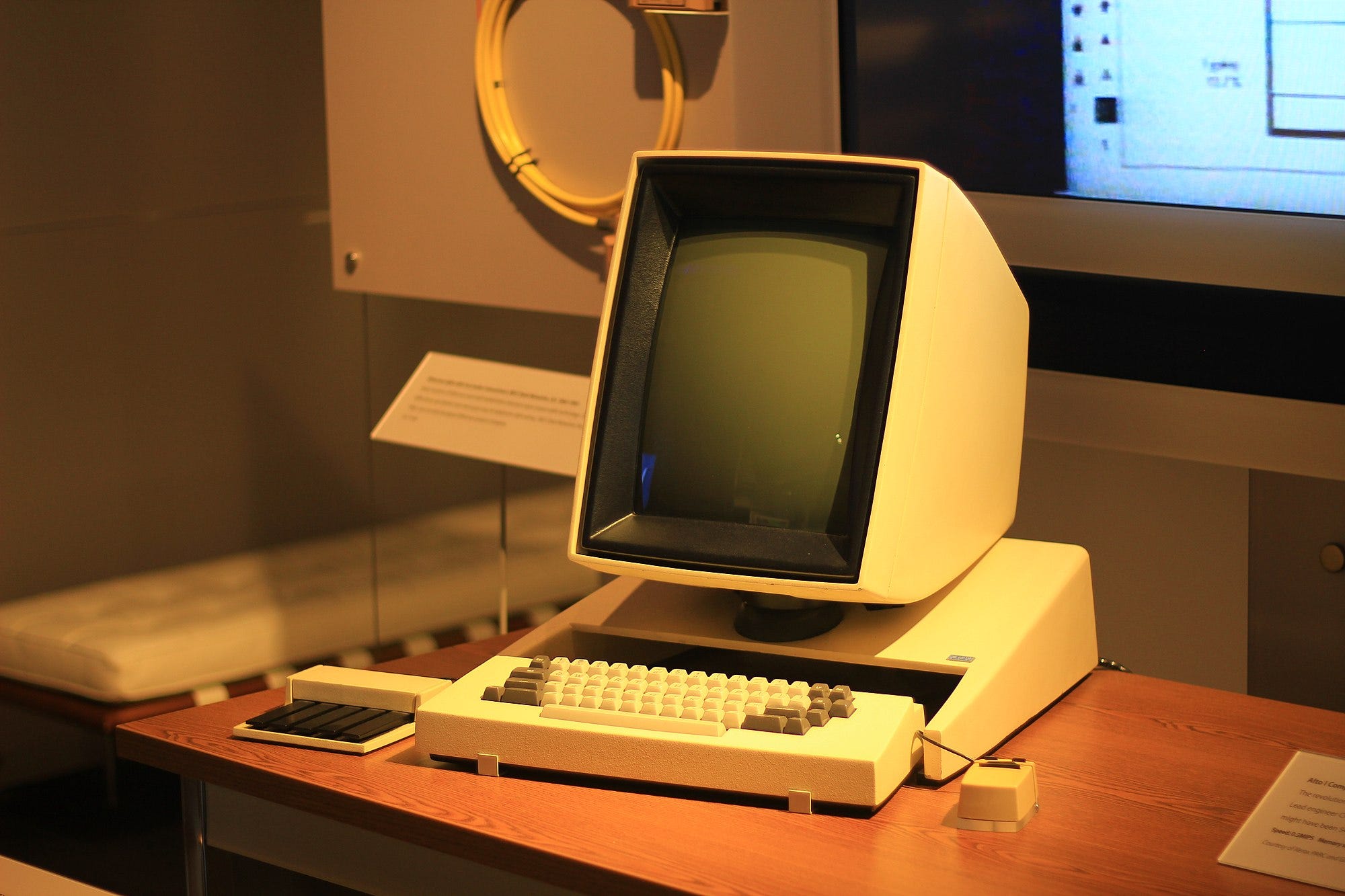
The desktop
In 1973, Xerox’s Palo Alto Research Center released the “Alto”. This was the first personal computer equipped with a “graphical user interface” (GUI) — computing with pictures — instead of the traditional “character user interface”.
If potential users — bowler-hatted bureaucrats who didn’t use computers at all — were to be persuaded to give up their card catalogue systems, typing pools and reusable manila envelopes and instead stare at a screen all day, the system would need to look as familiar as possible.
And so, to lessen the cognitive burden, Xerox came up with a visual metaphor. The Alto’s graphic user interface was modelled on a “desktop”. Instead of an impenetrable wall of green code and a flashing cursor, users were presented with a cartoonish depiction of a literal desktop and all its familiar iconography: documents, folders, a blotter, filing cabinets, in-trays, out-trays and even a dinky little waste-paper basket. This even extended to types of document that did not exist in an analogue office: Emails were depicted as little envelopes with a stamp and a wax seal.
All was designed to reassure the meatware — as fearful of incipient obsolescence then as it is now — that the change journey from the comfy old analogue world to the coming atomic age would not be so bad after all.
The spreadsheet
In 1979, Dan Bricklin and Bob Frankston created a new application for the Apple II computer. They called it “VisiCalc”. It was a grid of cells that you could input numbers and text into and then run calculations on by reference to cell coordinates. VisiCalc was the first spreadsheet program: a primitive ancestor to that beast we all now know and love as Microsoft Excel.
VisiCalc’s brilliant innovation was to separate the data you wanted to manipulate — the numbers and text in the cells — from the logical operations you wanted to manipulate them with — quasi-mathematical formulae — which referenced just the coordinates of the cells holding the data, not the data itself. You could therefore change the data without upsetting the calculation parameters. VisiCalc established a rudimentary form of programming language. A spreadsheet is a sort of programme. This may seem redolent of a smart contract, by the way. That is because it is. But let us not be distracted.
It might not have seemed much in 1979, but VisiCalc and its heirs would revolutionise business computing. While not nearly as intuitive as the Alto’s “desktop” — there was no graphic user interface or anything like that — VisiCalc was a much purer expression of what a personal computer could do. It promised even modest undertakings a powerful means of storing, augmenting, filtering, analysing and manipulating unprecedented amounts of information as structured data.
Good and bad metaphors
A spreadsheet is a much better way of thinking about how to organise digital information than a desktop because it is not constrained by physical space. Whereas the information on a traditional desktop is embedded in a physical “substrate” — usually paper — digital information has no such limitations. An empty spreadsheet stretches endlessly away in two directions:
Downwards: You can add items — “artefacts” — to your filing system without limit, unconstrained by the area of your desk or the volume of your filing cabinet. Each new artefact occupies a new row. There is an infinite number of rows.Across: You can categorise each artefact however you like by creating new columns. There is no limit to the number of columns and no necessary hierarchy between them.
The desktop is designed to manage physical properties that digital information does not have. In printed information, paper is “form”, text is “substance”. A desktop must prioritise form because in a physical system, substance cannot exist independently of form. Data must be printed on paper. Paper must be put somewhere. Unless you physically copy it, you can only put a piece of paper in one place at a time.
Older readers may remember the Dewey decimal system, by which libraries numbered the entire corpus of non-fiction wisdom from zero to 1,000. My favourite was 001.9: “Mysteries and the Unexplained”. But the Dewey system addressed an exclusively physical problem: where to put things that could only be in one place at a time. We don’t need it online.
For the same reason, we don’t need the desktop. It was designed around other purely physical constraints, too. Storing physical information, on paper, is expensive. Copying and transporting paper is expensive, slow and “lossy”. With each copy we make we increase our storage costs and lose some fidelity.
But digital information has — almost — no “form” at all. It does not occupy physical space. It costs nothing to store. We can copy and move it costlessly, instantly, and with no loss of fidelity. At least when compared with physical information, digital information can be everywhere, and nowhere, at once. We are not constrained by space or time when we store or move digital information.
Yet to file it, we insist upon using a metaphor that assumes we are.
A front in the battle between substance and form
The desktop prioritises form.A spreadsheet prioritises substance.
In a “desktop” structure, subfolders are sub-divisions, each further level down more fine-grained and subordinate than the last. The deeper the folder structure, the less significant the artefact relative to the formal hierarchy. The folder structure is logically prior to the artefact because you cannot put anything into the system until you have fully specified its folder path. The end-folder has to be there to put the document into it.
The desktop therefore buries documents at the bottom of the filing structure. If you want to retrieve one, down the folder-path rabbit hole you must go. Heaven help you if your document has been misfiled.
In a spreadsheet, the substance takes priority. The artefact is the first thing to go in the database, and sits at the top. Only then do we apply formal properties to our artefact. These formal properties are thus incidental.
And where folders are divisive in nature — a subfolder is necessarily a sub-division of the folder it sits in — spreadsheet columns have no hierarchy, need not bear any relation to each other, and are therefore multiplicative: they can be multiplied without limit: if an existing column, or an artful combination of them, doesn’t yield the exact information you need, you can always add more columns.
Now, naturally, we like hierarchies. There is not a social structure on the face of the earth that doesn’t have one. Hierarchies place things in a permanent, graspable relation to each other. This is comforting. It feels tangible in a virtual realm that natively is not tangible. Flexibility is good for experts, improvisers and virtuosi, but it intimidates everyone else. Hierarchy is important when we want dependability and reliability.
And here we find our old friend the struggle between form and substance: if we take it that, whatever your metaphor of choice, the “artefact” — the thing being filed — is the substance and the organising system it goes into is the form, we can see that the desktop and the spreadsheet are fundamentally opposed philosophies.
Metadata
Each desktop folder or spreadsheet column is metadata about its artefact — literally, “information about information”. A folder structure generates a limited, anaemic sort of metadata in the shape of the folder name: an alphanumeric label of up to 260 characters that is so limited in what it can be used for that the Windows operating system does not treat it as metadata at all. A spreadsheet, by contrast, imposes few limits on what form metadata can take: text, calculable numbers and dates, checkboxes, people, colours, flags, choices, lookups, comments, concatenations or calculations. Spreadsheet metadata can be compulsory, optional,…