As readers of this chapter have seen, the theme of Office11 continues to be enterprise, though now it is turned up to 11 so to speak. Despite my concerns about end-users and reviewers, the unstoppable force at Microsoft remained enterprise customers and meeting their needs or the needs of our growing sales force serving them—whether those needs were technology, positioning, or strategy, as expressed by customers or the field sales teams. A key attribute of enterprise software strategy is connecting the dots and making sure one part of the full enterprise stack uses (or leverages) another part. A cynical view of this is that it encourages a form of lock-in relative to the Microsoft stack of software. A practical view is that customers appreciate this interconnectedness because they are buying everything in a bundle and broader usage of what is already owned offers a high return on that investment. A charitable view of such a strategy is how it makes for more elegant implementations where the various parts simply work together. Perhaps the story of Windows Rights Management (also called Information Rights Management within Office) generated a seemingly unachievable level of complexity while simultaneously facing an unrelenting technical buzzsaw of customer feedback.
This lesson from this section is not a one-off. Instead it is prototypical of the era but also what happens when a product pivots to enterprise customers and the enterprise relationship dynamic defines how products are built. It is a tale of caution.
Back to 072. Notes on Tablet PC Innovation
“I’d like to present to the witness Exhibit 6508, Bates number 0017811. Mr. Sinofsky, do you recognize this email that lists you as the sender?”
To anyone involved in modern litigation, especially being deposed, there’s a sinking feeling that comes with being presented an old email. A similar feeling arises when receiving a call from a reporter starting with, “I was just anonymously forwarded an email about . . .”
Email became ubiquitous across the corporate world by the early 2000s. With the rise of companies moving ever faster came “business at the speed of thought” (that was the name of Bill Gates’s second book from 1999) or “flattening organizational hierarchy,” to name two of the many touted benefits of email. In the early days, while senior managers at non-tech companies were still having email printed out for them and assistants transcribing email replies, not much thought was given to the permanence of email or the instant impact of an employee innocently (or not) forwarding email outside the company.
Every company that deployed email and embraced an email culture eventually wound up with a company policy on the use of email, likely explaining the ramifications if one were to be less than scrupulous in his or her use of email.
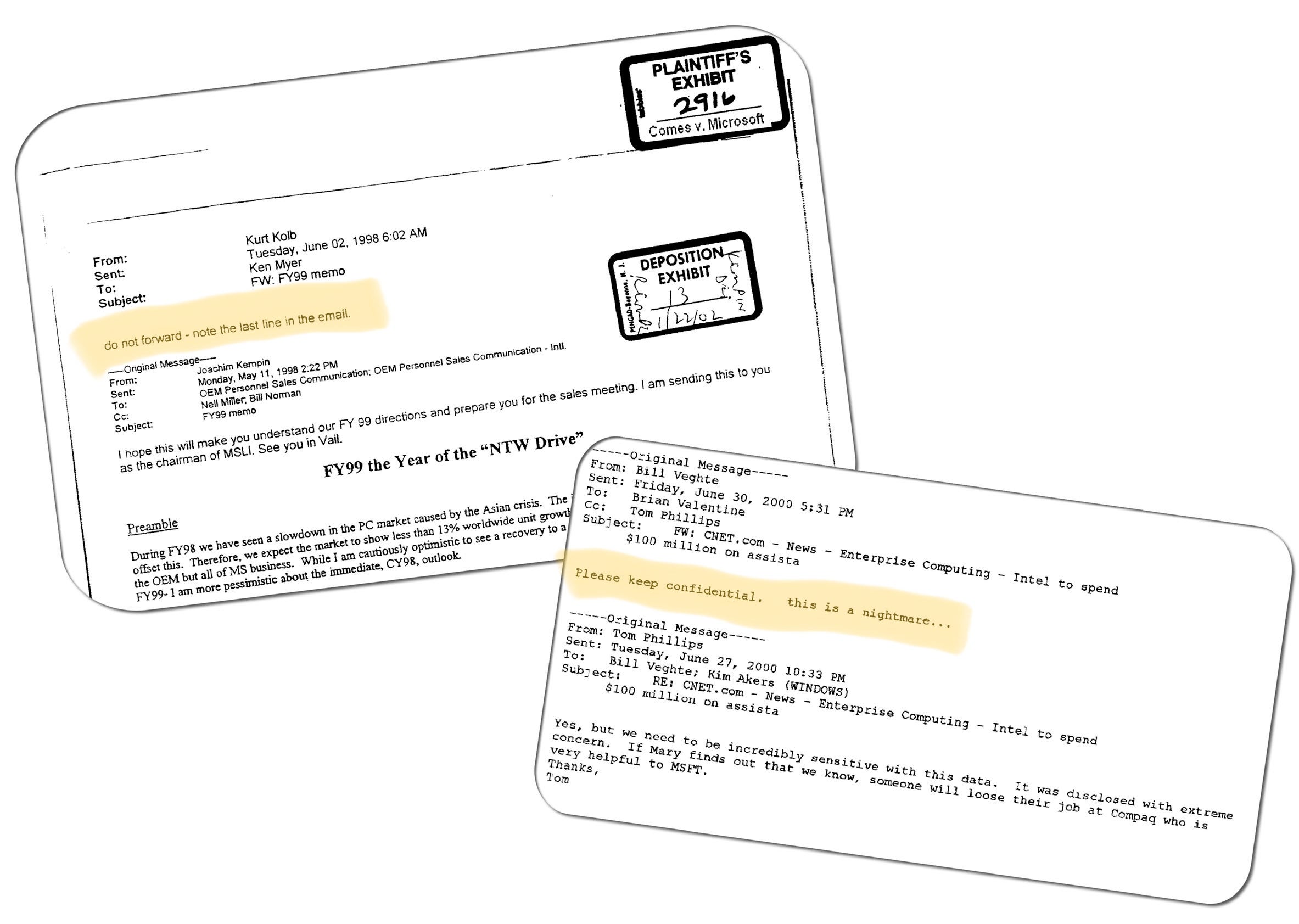
Born out of this were automatic disclaimers placed at the bottom of email, “THIS INFORMATION IS CONFIDENTIAL,” or my favorite, simply writing in red letters across the top of a message (perhaps the first use of rich email formatting) “CONFIDENTIAL.” We should not forget putting “**DO NOT FORWARD**” before the subject line of the email. We all knew that those emails were the important ones, and these warnings weren’t even worth the bytes they took up—copy/paste and printers still worked. Just in case there was a button on every keyboard since the first PC “Print Screen”.
Outlook featured commands that implied “Confidential” and “Do Not Forward,” though these did little more than offer a fancy version of red text and, worse, were invisible to recipients reading the mail on systems other than Outlook.
Maintaining the corporate confidentiality of email became the Achilles heel of the platform, except that email found such incredible product-market fit that there was no putting the toothpaste back in the tube. Customers wanted a solution that protected email misuse, or more clearly made Outlook enforce a company email policy or intent of the sender.
Over the previous several releases of Office, we steadily improved the ability to encrypt Office documents. Office always had the ability to add a password to documents, and for years a top call to customers calling PSS was trying to retrieve a lost password (Microsoft provided no help, but a search on the internet quickly led to a variety of tools that worked with trivial effort up until about Office 97, and incidentally those search results were a common way to spread malware). We eventually added true encryption that made it increasingly difficult to read a document that was not yours to read. This level of security eventually became minimal as the ability to break encryption techniques had steadily improved.
A peak effort and an early test of our platform capabilities for encryption was working to win approval for Outlook and Exchange to be used in the Defense Messaging System in the Department of Defense in the United States. Implementing the required encryption was useful only to the Defense Department but we eventually added it anyway. That was not before the head of North American sales, Orlando Ayala (OrlandoA) made his case to me by standing on top of a table in the briefing center begging for an update to support the DoD. I was terrified. The customers were impressed. We did the work.
The core of implementing encryption was an ongoing collaboration between Windows and Office, as well as Microsoft Research. Encryption was not exactly one single thing or feature, but a complex platform that required servers, user identity, and a lot of sophisticated math. It was exactly the kind of infrastructure that enterprise IT was gobbling up in the early 2000s. The old days of encryption were rapidly being supplanted by the need to encrypt information that flowed across the public internet and used public internet infrastructure. It was no longer as simple as a closed network with known proprietary endpoints.
Protecting files (and messages) with encryption was not without controversy, and without exaggeration for some technologists it was a line in the sand—crossing it put one squarely in the camp of the man. Encryption often collided head-on with the libertarian roots of the software field. Encryption was something of a third rail in the counter-culture elements of software.
The rise of the internet for online commerce created a brief moment where software vendors got caught up in the intricacies of import/export laws related to military products, specifically munitions. For a few years, the basic encryption algorithms—the results of widely-published academic research—were classified as munitions by US law and thus restricted for export. The hardcore technology advocates created a t-shirt featuring the code that implemented encryption with the implied threat that wearing such a shirt through a border crossing might subject the individual to law enforcement action of the highest order. The result was a headache for software vendors who maintained a secure version of products for the US market and a markedly less secure version for “export”. President Clinton signed an executive order ending this awkward situation and at least one type of encryption flourished.
Broader awareness of encryption came about because of th…