Introduction
Salesforce automation can be a game-changer for small businesses and entrepreneurs who want to streamline everyday processes, nurture leads more effectively, and ultimately boost sales. This article is designed to guide you through the foundations of Salesforce automation solutions, revealing how they work, why they matter, and the practical steps you can take to implement them. By the end, you’ll have a clear roadmap for setting up CRM workflows, automating lead nurturing, and leveraging Salesforce marketing automation to drive sustainable growth.
Salesforce automation refers to the use of built-in or custom processes within the Salesforce CRM platform to eliminate manual tasks and enhance efficiency. It goes beyond just creating email reminders or notifications—it’s about building interconnected workflows that intelligently move contacts, leads, and data through your funnel.
Small business owners and entrepreneurs can struggle with time-consuming administrative tasks, limited staff resources, and fragmented customer data. Salesforce automation addresses these issues by:
When exploring CRM workflows for small businesses, it’s helpful to understand the core components:
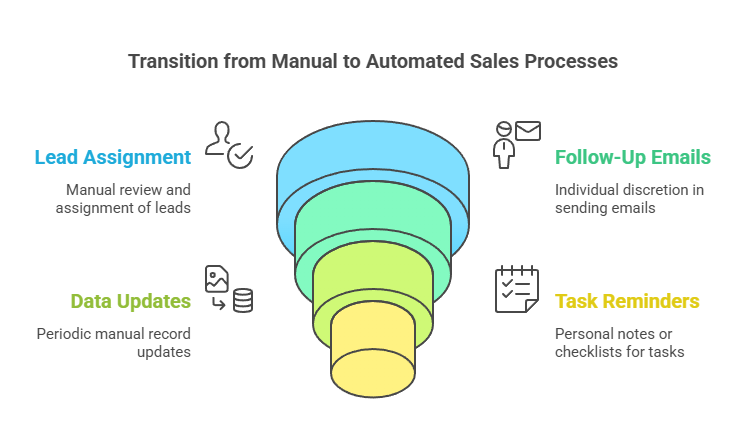
| Aspect | Manual Approach | Automated Approach |
|---|---|---|
| Lead Assignment | Sales manager reviews new leads and assigns them | Automatic routing based on territory, size, or custom criteria |
| Follow-Up Emails | Individual reps send emails at their discretion | Scheduled drip campaigns for lead nurturing |
| Data Updates | Team members update records periodically | Real-time updates upon form submissions or workflow triggers |
| Task Reminders | Sales reps keep personal notes or checklists | Salesforce tasks auto-created with due dates and notifications |
By converting these manual tasks into automated workflows, you remove bottlenecks and keep your team focused on activities that truly require human insight.
Before diving into Salesforce CRM best practices, it’s crucial to ensure certa...